Assign an Access Group to a Cardholder
1.0 Introduction
Once access groups have been setup they can be assigned to cardholders.
2.0 Access Group Assignment Limitations
- For NXT controllers there is a maximum of 8 access groups per cardholder.
- For Neutron controllers there is a maximum of 8 access groups per cardholder.
- For PXL controllers there is a maximum of 1 access group per cardholder, apart from the following circumstances:
- all controllers and readers are added to separate groups.
- the controller does not have doors existing in different access groups.
- a controller is not listed in more than one group. - For NXT-MSC controllers there is a maximum of 32 access groups per cardholder.
- For Mercury SCP controllers there is a maximum of 32 access groups per cardholder.
3.0 Assigning Access Groups to Cardholders
- Go to Home >> Cardholders to display the cardholder list.
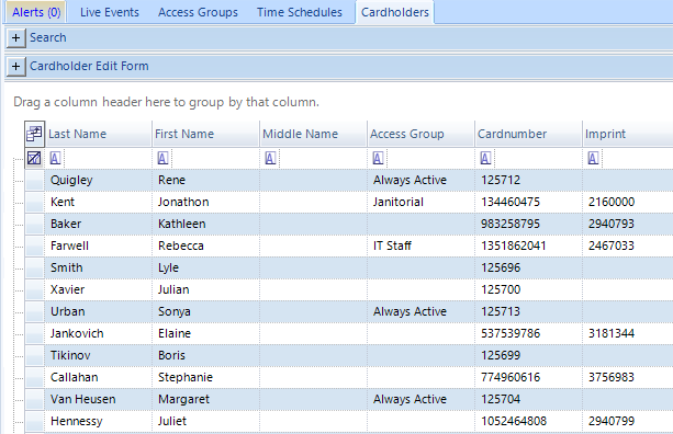
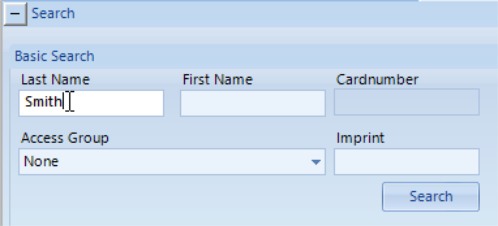
- Double-click a cardholder name or locate a cardholder using the Search facility.
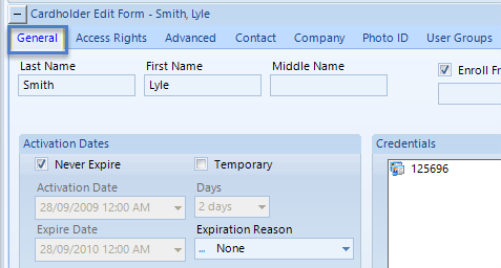
- The cardholder record will open on the General tab.
- To assign an access group, click on the Access Rights tab.
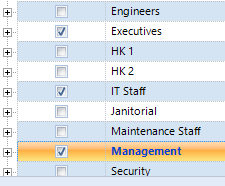
- You will see a list of all the access groups on the system.
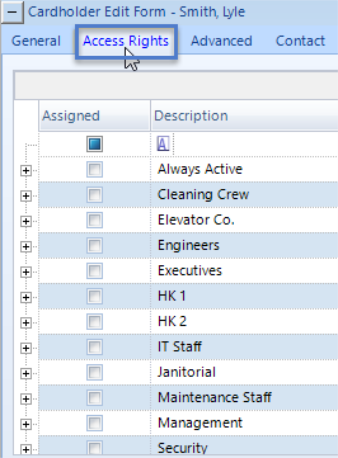
- Place a check mark against the access group(s) you wish to assign.
- Save the settings using one of the save icons in the upper left corner.
- The settings will be sent out to the access control network immediately. There is no need to perform any kind of manual download or update.