Neutron Licensing Requirements
To use the Neutron controllers you will need a license key with the
Neutron hardware type enabled. The license key with Neutron enabled will
automatically be configured to support up to 8 controllers. You can
either contact Keri Systems sales for a license key or you can generate
your own key at the following URL: license.kerisys.com.
Verify Neutron is Enabled on Your License
This section assumes you have already successfully installed the Doors.NET software and have activated your license:
Note: The Neutron hardware type cannot co-exist with other hardware types. When Neutron is enabled on your license only Neutron controllers can be used on the system.
- From Windows Start menu go to Doors.NET >> License Manager.
- When the License Manager window opens, select Application Server.
- Click the License tab on the right pane.
- Locate the Capacities section and verify that NXT-NEUTRON is set to 8 controllers.
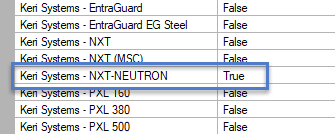
- Scroll down to the Supported Hardware section and verify that NXT-NEUTRON is set to True.
- If Neutron is enabled you will be able to add the Neutron gateway.